
Kick a Lucky Block is a rapidly skyrocketing experience on Roblox. In the game, players kick Lucky Blocks to obtain random rewards—specifically various forms of brainrot—ranging from basic varieties to rare and powerful types. One of the game's most practical social features is the Gifting system, which allows you to send items or brainrot to your friends. This article will provide a detailed explanation of exactly how to do this.
Understanding the Gift Feature
The Gift feature is a highly practical in-game social tool that allows players to exchange items with one another. Through it, you can directly gift your Brainrots—the small pets you’ve unlocked that generate income for you—to other players or friends currently on the same server. If you are a newcomer, we recommend first familiarizing yourself with the game's core gameplay loop: continuously kicking Lucky Blocks into increasingly distant zones to unlock Brainrots of higher rarity and greater power. These Brainrots will automatically generate money for you, allowing you to upgrade your own abilities; this, in turn, enables you to kick blocks even further and acquire even stronger Brainrots, creating a positive feedback loop of progression.
Detailed Unlock Steps
The unlocking process is remarkably simple and requires no complex procedures:
1. Log in to the game for the first time
Ensure that you have logged into and entered Kick a Lucky Block at least once. This action effectively creates a timestamped login record within the game's database.
2. Wait until the second calendar day
This is the most critical step. The unlock condition is based on the actual date of your initial login; you must simply wait until the next calendar day—a minimum interval of 24 hours is required. Please note that this calculation is based on real-world calendar days, not your total in-game playtime. Regardless of how long you played on your first day—even if only for a few minutes—the feature will become available to you on the second day. If the feature still appears locked, it indicates that 24 hours have not yet elapsed since your initial login.
Example: If you enter the game for the first time at 11:50 PM on a Monday, then as soon as midnight passes—say, at 12:01 AM on Tuesday—the Gift feature should theoretically become available to you.
3. Using the Gift Feature
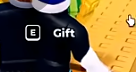
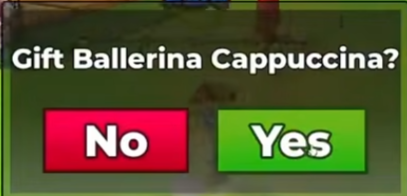
Once the prerequisites have been met, you can begin using the gifting function within the game. First, hold the specific Brainrot you wish to gift in your hands. Then, approach the player you intend to gift it to; a prompt will appear (typically displaying the E Gift button). Clicking this prompt will trigger a pop-up window asking you to confirm the recipient. Clicking "Yes" sends a gift invitation to that player; the recipient must then click to confirm acceptance in order to successfully receive the gift.
Important Notes
- Detailed Time Calculation:Unlocks are strictly based on server-side calendar days and are independent of your personal cumulative online time. If you do not see a specific feature on Day 1, please wait patiently until Day 2 to check again.
- Early-Game Unlock Strategy:During the period leading up to feature unlocks, it is recommended that you focus on progressing through the game's main quests, mastering basic controls, and stockpiling resources in advance for potential future exchanges. You may find the following efficient progression path helpful:
Skip the early-game Stone Block (which offers poor value for money) and save up directly to purchase the Bone Barbell ($7,500) and Copper Plate ($500,000).
Fulfill the necessary conditions as early as possible to complete your first Rebirth. This grants you a permanent 2x Cash Bonus, making your subsequent progression significantly more efficient. - Feature Description and Rules:The Gift feature is primarily designed for sending Brainrot and Gamepasses to other players. Please note that once a gift has been successfully sent, the transaction cannot be reversed; therefore, please be sure to carefully verify your selection before proceeding.
Final Thoughts
All in all, unlocking the Gift feature in Kick a Lucky Block is simply a matter of time. You don't need to complete any complex tasks or reach a specific level; all you have to do is wait patiently until the next day. We hope this guide helps you successfully unlock the feature so you can enjoy the fun of exchanging your favorite items with friends!