

In the popular Roblox farming game Grow a Garden, trade tokens are an important in-game currency used to purchase rare items and speed up game progress. However, trade tokens are relatively rare, requiring players to invest time and effort in accumulating them. This article will explain the uses of trade tokens and the most reliable methods for acquiring them in the game, helping you obtain more trade tokens.
Role and Function
Trade Tokens are primarily used as a currency for player-to-player transactions within the Farmers Market. You cannot acquire them by completing daily tasks, harvesting crops, or participating in events, and they do not play any role in your garden.
Trade Tokens can be used to purchase the following categories of items:
- Pets: Various common, rare, and event-limited pets
- Plants: Various crops and rare mutated plants
- Seeds: Various plantable seeds
- Booth Skins: The appearance of your stall used for decoration and to attract customers.
How to Get
Currently, there are two ways to acquire Trade Tokens: selling items and purchasing them directly from Robux.
1. Selling Items in the Farmers Market
This is the most fundamental way for all players to accumulate Trade Tokens, requiring no initial capital. The specific steps are as follows:
Step 1: Enter the Farmers Market
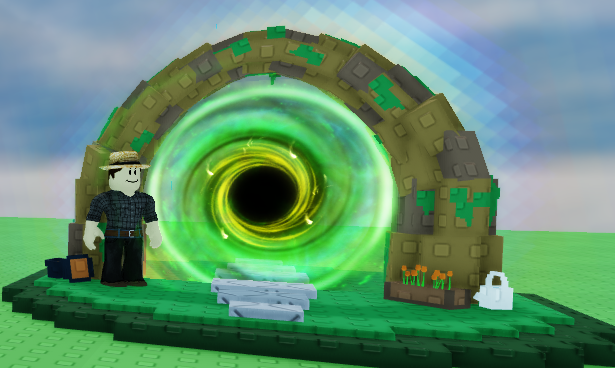
There will be a green portal at the left or right end of the server. Find it and press the E key to teleport to the Farmers Market. Alternatively, you can directly click the Trade button on the screen and select "Travel to Farmers Market" for quick access.
Step 2: Claim an Empty Stall
Each server has approximately 30 player stalls in the Farmers Market. Find an empty stall that displays "Unclaimed," approach it, and press the button to claim it. Basic stalls can be claimed for free, and default free skins can be used.
Step 3: List Items and Set Prices
In front of the stall, press the interact button to open the My Booth menu. Click the green plus button or the Create Listing option. Select sellable items from your inventory (Pets, Plants, Seeds, Booth Skins, etc. can all be listed), then enter the price, and confirm to list the item.
Step 4: Wait for other players to buy
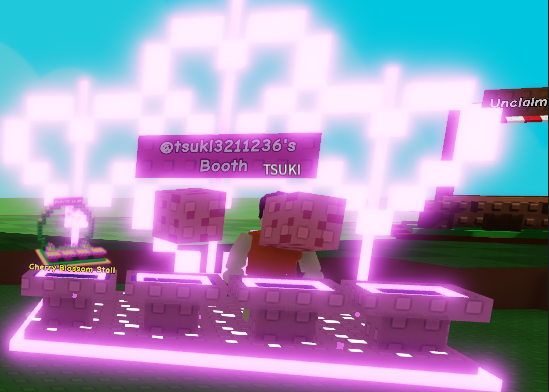
Once a player buys an item you listed, the corresponding amount of Trade Tokens will be automatically transferred to your account balance.
Important Notes:
- Each stall can display a maximum of 4 items at a time.
- Items listed must be in your inventory. It is recommended to prepare your items for sale before going to the market.
- The trading system will charge approximately 1% transaction fees. 1 Token will be deducted if the selling price is less than 100 Tokens, 2 Tokens will be deducted if the selling price is between 100 and 200 Tokens, and so on.
2. Buy Directly Using Robux
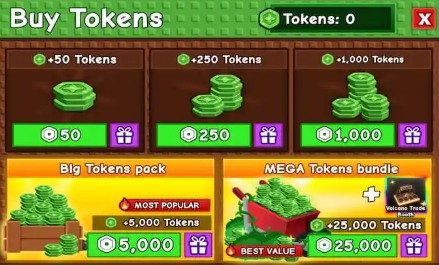
If you want to immediately acquire a large number of Trade Tokens instead of passively waiting for others to buy them, you can use Robux to buy directly. This is the fastest way. The approximate package is shown below:
| Robux Cost | Trade Tokens Received |
|---|---|
| 50 Robux | 50 Tokens |
| 250 Robux | 250 Tokens |
| 1,000 Robux | 1,000 Tokens |
| 5,000 Robux | 5,000 Tokens |
| 25,000 Robux | 25,000 Tokens |
The exchange rate is 1:1, with no additional fees, and tokens are credited instantly after purchase.
Advanced Suggestions
After mastering the acquisition methods, how can you accumulate tokens faster? The following strategies can be used as a reference:
1. Utilize the RAP Pricing System
RAP is the average reference price calculated based on recent transaction prices across all servers in Grow a Garden. It appears on the product pricing page. Referring to RAP can effectively avoid pricing discrepancies.
- Commonly Circulating Items:Price within ±10% of RAP, aiming for stable turnover.
- Quick Cash Out: Price 15%–20% of RAP, using lower prices to boost sales and liquidity.
- Limited Items: Price can deviate slightly from RAP, but it's crucial to observe in-game supply and actual demand beforehand.
- Psychological Pricing Techniques: Using numbers like 9, 19, and 199 can effectively stimulate other players' purchasing intentions.
RAP Usage Reminder: The RAP system currently does not calculate pet attributes such as weight and age. Therefore, when selling older, heavier pets, do not blindly refer to RAP pricing.
2. Stall Display Techniques
Hold your high-value pets in your arms and stand behind your stall as a "human billboard" to attract passing players.
Place a high-priced item in your booth as bait to attract customers, while simultaneously offering several affordable items to encourage actual transactions.
3. Transaction Security
Set a 4-digit PIN code in the game settings. The system will provide 8 recovery words, which you can write down. If your account is stolen, this PIN code is the only barrier preventing others from trading your entire inventory.
Many third-party platforms also offer Trade Tokens top-up packages, which are cheaper than in-game. However, check the website's security. Choose a trustworthy Grow a Garden Shop, such as BLOXB.com, where you can safely purchase Trade Tokens.
Final Thoughts
Trade Tokens are the exclusive trading currency in the Farmers Market of Grow a Garden. There are two ways to acquire them: selling items (claiming a stall and listing goods for other players to buy) and purchasing directly from Robux. Players are advised to make full use of the RAP pricing system to set reasonable prices, while also paying attention to transaction security measures, steadily accumulating Trade Tokens, and gradually building their own trading empire.